Appearance

ts-spreadsheets
Easily generate spreadsheets, like CSVs and Excel files.
Features
- Generate CSV & Excel files
- Store spreadsheets to disk
- Download spreadsheets as a Response object
- Simple API for creating and manipulating spreadsheets
- Performant & dependency-free
- Library & CLI support
- Fully typed
Usage
There are two ways to interact with ts-spreadsheets: via the CLI or as a library.
Library
As a library, you will want to make sure to install it in your project:
bash
bun install ts-spreadsheetsNow, you can use the library in your project:
ts
import { createSpreadsheet, spreadsheet } from 'ts-spreadsheets'

// Create a spreadsheet
const data = {
  headings: ['Name', 'Age', 'City'],
  data: [
    ['Chris Breuer', 30, 'Playa Vista'],
    ['Avery Hill', 25, 'Santa Monica'],
    ['Danny Johnson', 35, 'San Francisco']
  ]
}

// Generate and manipulate spreadsheets

// 1. Using createSpreadsheet function
const spreadsheet = createSpreadsheet(data) // defaults to csv
const csvSpreadsheet = createSpreadsheet(data, { type: 'csv' })
const excelSpreadsheet = createSpreadsheet(data, { type: 'excel' })

// Store the spreadsheet to disk
await spreadsheet.store('output.csv')

// Create a download response
const response1 = excelSpreadsheet.download('data.xlsx') // downloads and stores as data.xlsx on your filesystem

// 2. Using spreadsheet object directly, and chain if desired
const csvContent = spreadsheet(data).generateCSV().store('output2.csv')
const csvContent2 = spreadsheet(data).csv().store('output3.csv') // same as above

const excelContent = spreadsheet(data).generateExcel()
await excelContent.store('output3.xlsx')
const response2 = await excelContent.download('output3.xlsx') // downloads and stores as output3.xlsx

// 3. Accessing raw content
const rawCsvContent = spreadsheet(data).csv().getContent()
const rawCsvContent2 = spreadsheet(data).generateCSV().getContent()
const rawExcelContent = spreadsheet(data).excel().getContent()
const rawExcelContent2 = spreadsheet(data).generateExcel().getContent()

console.log('CSV Content:', rawCsvContent)
console.log('Excel Content:', rawExcelContent)
Main Functions
spreadsheet(data: Content)
Creates a spreadsheet object with various methods.
data: An object containingheadingsanddatafor the spreadsheet.
Returns an object with the following methods:
csv(): Generates a CSV SpreadsheetWrapperexcel(): Generates an Excel SpreadsheetWrapperstore(path: string): Stores the spreadsheet to a filegenerateCSV(): Generates a CSV SpreadsheetWrappergenerateExcel(): Generates an Excel SpreadsheetWrapper
Example:
typescript
const csvWrapper = await spreadsheet(data).csv() // equivalent to spreadsheet(data).generateCSV()createSpreadsheet(data: Content, options?: SpreadsheetOptions)
Creates a SpreadsheetWrapper with the given data and options.
data: An object containingheadingsanddatafor the spreadsheet.options: Optional. An object specifying the spreadsheet type ('csv' or 'excel').
Returns a SpreadsheetWrapper.
Example:
typescript
const spreadsheet = createSpreadsheet(data, { type: 'csv' })SpreadsheetWrapper Methods
getContent()
Returns the content of the spreadsheet as a string or Uint8Array.
download(filename: string)
Creates a download Response for the spreadsheet.
filename: The name of the file to be downloaded.
Returns a Response object.
store(path: string)
Stores the spreadsheet to a file.
path: The file path where the spreadsheet will be stored.
Returns a Promise that resolves when the file is written.
Utility Functions
spreadsheet.create(data: Content, options?: SpreadsheetOptions)
Creates a SpreadsheetContent object.
data: An object containingheadingsanddatafor the spreadsheet.options: Optional. An object specifying the spreadsheet type ('csv' or 'excel').
Returns a SpreadsheetContent object.
spreadsheet.generate(data: Content, options?: SpreadsheetOptions)
Generates spreadsheet content based on the given data and options.
data: An object containingheadingsanddatafor the spreadsheet.options: Optional. An object specifying the spreadsheet type ('csv' or 'excel').
Returns a string or Uint8Array representing the spreadsheet content.
spreadsheet.generateCSV(content: Content)
Generates a CSV SpreadsheetWrapper.
content: An object containingheadingsanddatafor the spreadsheet.
Returns a SpreadsheetWrapper for CSV, which can be used to chain other methods like store() or download().
Example:
typescript
await spreadsheet(data).generateCSV().store('output.csv')

// if one can rely on the file extension to determine the type, you may do this:
await spreadsheet(data).store('output.csv')
spreadsheet.generateExcel(content: Content)
Generates an Excel SpreadsheetWrapper.
content: An object containingheadingsanddatafor the spreadsheet.
Returns a SpreadsheetWrapper for Excel, which can be used to chain other methods like store() or download().
Example:
ts
await spreadsheet(data).store('output.xlsx')
// or
await spreadsheet(data).generateExcel().store('output.xlsx')
To view the full documentation, please visit https://ts-spreadsheets.netlify.app.
CLI
You can also use the CLI to generate spreadsheets from JSON input:
bash
# Create a spreadsheet from JSON input
spreadsheets create data.json -o output.csv
spreadsheets create data.json --type excel -o output.xlsx

# Convert between formats
spreadsheets convert input.csv output.xlsx
spreadsheets convert input.xlsx output.csv

# Validate JSON input format
spreadsheets validate input.json
The input json should follow this format:
json
{
  "headings": ["Name", "Age", "City"],
  "data": [
    ["Chris Breuer", 30, "Playa Vista"],
    ["Avery Hill", 25, "Santa Monica"],
    ["Danny Johnson", 35, "San Francisco"]
  ]
}
CLI Commands
create: Generate a spreadsheet from JSON input- Options:
-t, --type <type>: Output type ('csv' or 'excel'), defaults to 'csv'-o, --output <path>: Output file path
- Options:
convert: Convert between spreadsheet formats- Automatically detects format from file extensions
- Supports conversion between CSV and Excel formats
validate: Check if JSON input meets the required format- Validates structure and data types
- Provides helpful error messages for invalid input
All commands support the --help flag for more information:
bash
spreadsheets --help
spreadsheets create --help
spreadsheets convert --help
spreadsheets validate --help
Testing
bash
bun testChangelog
Please see our releases page for more information on what has changed recently.
Contributing
Please review the Contributing Guide for details.
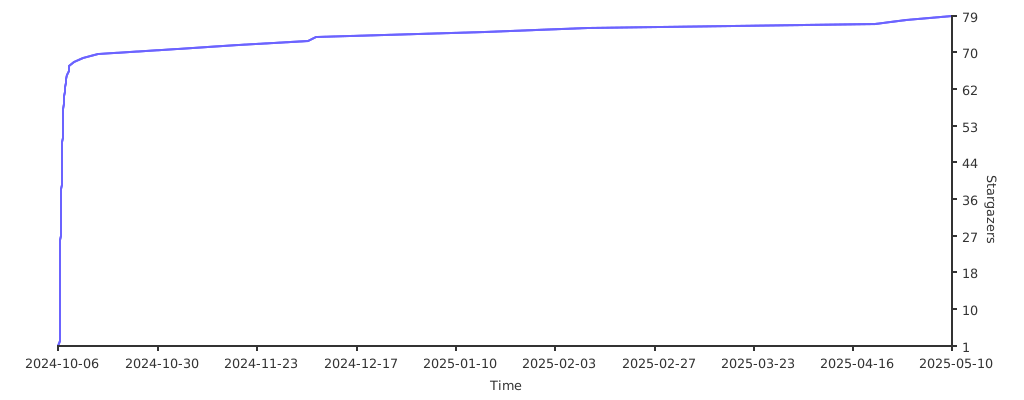
Stargazers
Community
For help, discussion about best practices, or any other conversation that would benefit from being searchable:
For casual chit-chat with others using this package:
Join the Stacks Discord Server
Postcardware
Two things are true: Stacks OSS will always stay open-source, and we do love to receive postcards from wherever Stacks is used! We also publish them on our website.
Our address: Stacks.js, 12665 Village Ln #2306, Playa Vista, CA 90094 🌎
Sponsors
We would like to extend our thanks to the following sponsors for funding Stacks development. If you are interested in becoming a sponsor, please reach out to us.
Credits
License
The MIT License (MIT). Please see LICENSE for more information.
Made with 💙